Evidence first, cleanup second.
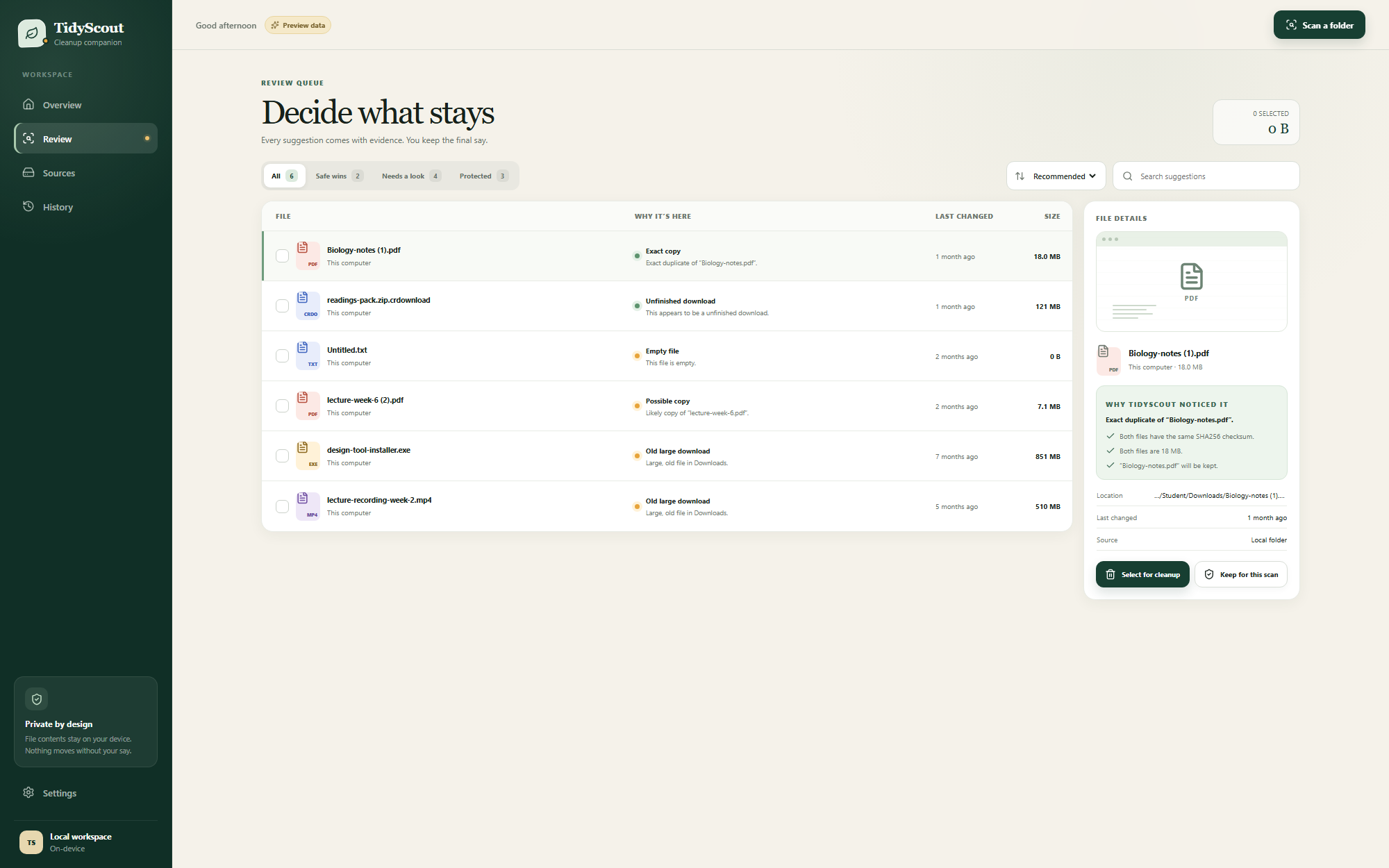
TidyScout doesn't guess. Every file it suggests comes with the concrete reason it was flagged — and everything it isn't sure about is labelled "needs a look", never auto-selected.
What TidyScout notices
Exact copies
Same-size files are fingerprinted byte-for-byte (SHA-256) on your device. Only true duplicates are flagged, and the original is always kept.
Unfinished downloads
Leftover .crdownload, .part and friends — downloads that never completed and never will.
Empty files
Zero-byte files like that "Untitled.txt" you created by accident and never noticed.
Likely copies
"lecture-week-6 (2).pdf" next to "lecture-week-6.pdf" — named like a copy, flagged for your judgement, never assumed.
Old large downloads
The 850 MB installer from months ago that already did its job. Big wins, clearly dated, your call.
Automatic protection
Anything changed in the last 30 days, marked important, or that you've chosen to keep is set aside and left alone.
Decide what stays
- Every suggestion shows why it's here, when it last changed, and its size
- Filter by confidence: safe wins, needs a look, protected
- Sort by size, date, name, file type — or TidyScout's recommended order
- An inspector panel shows the full evidence for any file
- One complete final list to confirm before anything moves
Cloud clutter, same care
- Connect with your Google account through Google's own sign-in page
- TidyScout requests metadata-only access — names, sizes, dates. It cannot read what's inside your documents
- Duplicate uploads are matched using Google's own file fingerprints
- Removed files go to Google Drive's Trash, recoverable for 30 days
- Works in the desktop app and straight from your browser — no install needed for Drive cleanup
A transparent trail
- Every cleanup is recorded: how many items, how much space, when
- No mystery deletions — what moved is always visible after the fact
- Combined with the Recycle Bin, you always have a way back
Two ways to run TidyScout
The browser version needs no install and can tidy Google Drive; the desktop app adds real Recycle-Bin cleanup for your local folders.
| What you can do | In your browser | Desktop app |
|---|---|---|
| Scan folders and review suggestions with evidence | Yes | Yes |
| Sort, filter, search and protect files | Yes | Yes |
| Clean Google Drive (to Drive Trash) | Yes, once connected | Yes |
| Clean local files (to the Recycle Bin) | Review only | Yes |
| Stays signed in between visits | Reconnect each session | Secure credential vault |
Try it on your Downloads folder
Point it at the mess, read the evidence, and take back your storage.